Make a QR code
Your link as a QR code, with your logo in the middle. For your menu, your poster or your stickers, plus an A5 poster to print straight away.
What does the tool do?
A QR code on the table, at the till or on a flyer takes people to your menu, your website or your reviews in one scan. Your link goes directly into the QR code: whoever scans it sees your address straight away, not that of another site.
What do you get?
Your QR code as a PNG for your website or a post, as an SVG for the printer, and an A5 poster to print, with your logo and your colours.
What does it cost?
A QR code with poster costs 1 credit. Changing the sentence, the colours and the logo and downloading again is free. One credit is 1 euro. No subscription: you buy credits when you need them, and they never expire. If something does not work, you get your credits back.
An example
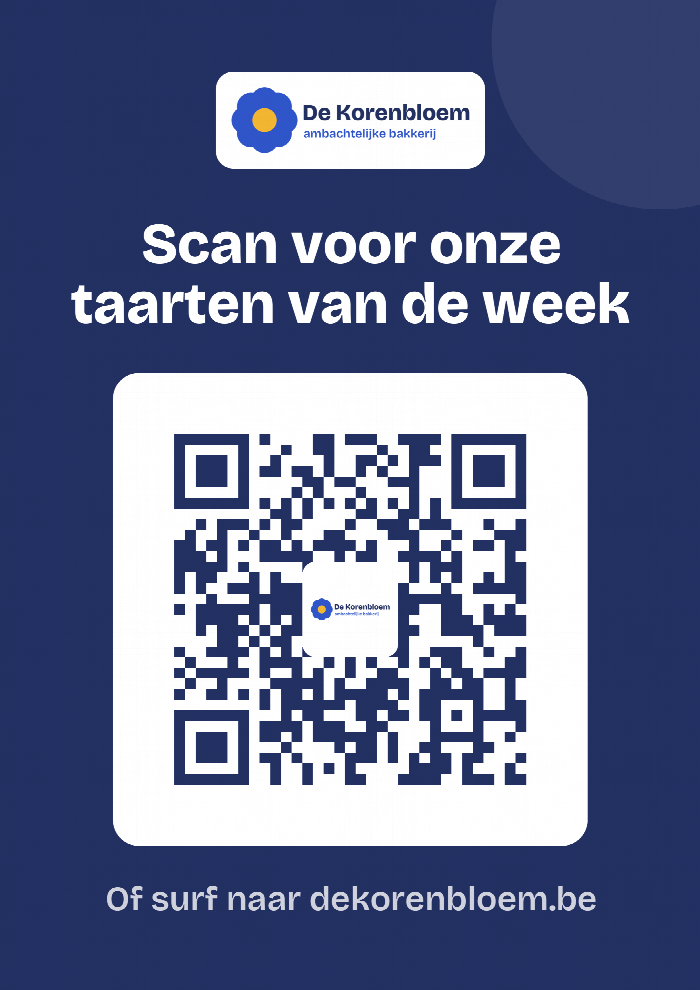
Bakkerij De Korenbloem puts a QR code on the counter, linking to the cakes of the week. This is what the baker filled in:
- Link
- https://dekorenbloem.be/taarten
- Name
- Cakes on the counter
- Sentence on the poster
- Scan for our cakes of the week
And this is what he got back:

Questions about this tool
How long will my QR code keep working?
Forever. Your link is in the QR code itself, there is nothing of ours in between. As long as your link works, your QR code works.
Can I change the link later?
No, the link is fixed in the QR code. If your link changes, make a new QR code. You can change the sentence on the poster, the colours and the logo for free.
Does the QR code work with a logo in it?
Yes. A QR code still works when a small part is missing. Always test it with your phone before you have it printed, though.